Luxury Car Charge
Overview
Luxury Car Charge (LCC) can be used in your quote pdf to provide a complete summary of a driver's salary effects and/or payroll calculations.
These calculations can be affected when you use "Months Deferred" in your quotes.
LCC can be incurred even if a car does not attract a Luxury Car Tax.
The requirements for LCC can be found in the ATO publication / Guide to depreciating assets 2018 (or later iterations of this). The 'charge' is related to tax deductions for leases and applies to company tax paying entities only.
Luxury Charge Invoiced Configuration
A client-level setting called Luxury Charge Invoiced determines whether the calculated LCC liability is included in quote budgets or absorbed by the employer.
The setting is maintained on the Client > Quote Defaults tab and can be configured as follows:
Yes (default) – LCC is invoiced to the employee and the LCC budget is included in the quote.
No – LCC is absorbed by the employer and the LCC budget is suppressed from the quote by setting the budget amount to $0.00.
This allows organisations to control whether LCC forms part of the employee's lease budget while still retaining the underlying LCC liability value for reporting purposes.
Deferred Periods
Where Months Deferred has been applied to a quote, the LCC budget calculation is adjusted so that the total annual LCC liability is recovered across the active payment periods rather than the full lease term.
For example:
Lease Term = 48 months
Deferred Months = 3
Billing Periods = 45
The monthly LCC budget is increased proportionally to ensure the total LCC liability remains accurate across the reduced payment period schedule.
Quote Calculation Process
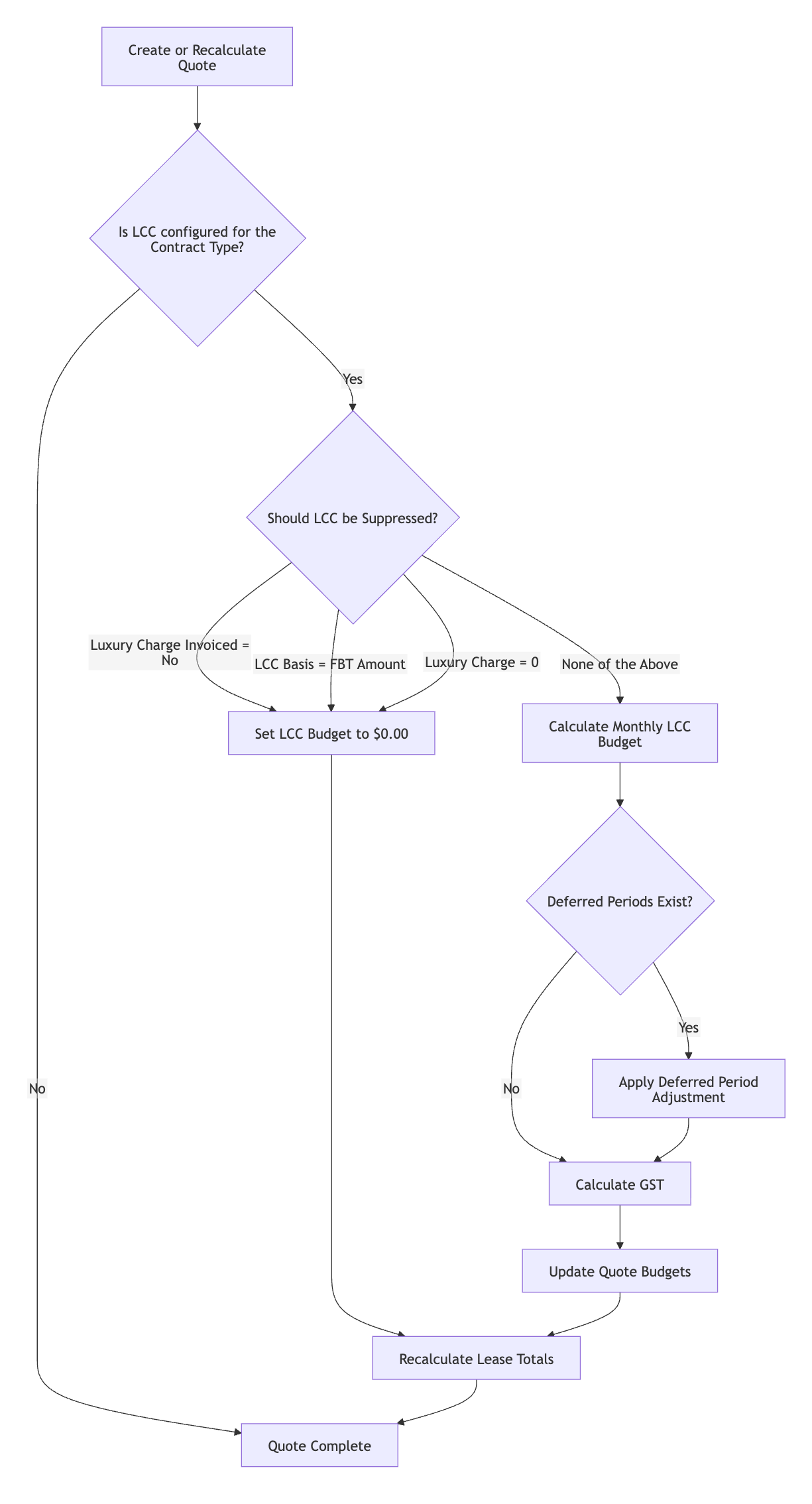
When a quote is created or recalculated, the system evaluates whether an LCC budget should be generated. The process is:
Determine whether the selected contract type has an LCC posting class configured.
If no LCC posting class exists, no LCC budget is created.
If an LCC posting class exists, the system evaluates the following suppression conditions:
Luxury Charge Invoiced = No.
The Luxury Charge Basis system control is set to FBT Amount.
The calculated Luxury Car Charge amount equals $0.00.
If any suppression condition is met, the LCC budget amount is set to $0.00.
If no suppression conditions are met, the monthly LCC budget is calculated using the annual LCC amount divided by 12.
Where deferred periods apply, the monthly LCC budget is adjusted to spread the liability across the reduced number of billing periods.
The resulting values are written to the quote budget and lease totals are recalculated.
Process Flow
Reporting
The calculated annual LCC amount remains available on the quote regardless of whether the LCC budget has been suppressed.
For clients that do not invoice LCC to employees, reporting solutions should use the annual Luxury Car Charge value as the source of truth rather than the quote budget amount, as the budget may be intentionally set to $0.00.
Calculation
To see the calculations in detail, review the Diminishing Value Calculator and the Prime Cost Calculator models.
Also visit the LCT Limits page to see the current control values that are used in the calculations.
Vehicle types that are lct_exempt are excluded.
Additional Information
Luxury Car Charge is different than Luxury Car Tax.
For details about Luxury Car Tax please visit the Luxury Car Tax page.
Quote Variables
Quotes / Finance
The field "Luxury Car Charge" is stored on the bottom left of the screen and populates with the calculated LCC amount for the quote. If using LCC in your quote pdf, this is the value that will be displayed.
By default, this field can only be edited by 'admin' users. This is a role restriction, so other roles can be given access if required.
Quotes / Lease
You can use the LCC budget to incorporate the vehicle's Luxury Car Charge into the lease costs.
A budget amount will calculate and populate if set-up to do so.
This is 1/12th of the stored amount in the Quotes / Lease "Luxury Car Charge" field.
Open the LCC Budget calculation model.xlsx to see the working calculation.
The LCC Budget will not calculate if [gb_controls]luxury_charge_basis is set as 'fbt_amount'.
To use this budget:
Go to Posting Classes / Details and check that "Class Code" 'LCC' exists and create it if it is missing.
When creating 'LCC', make sure the event check-boxes are un-checked. The class "Name" displays as the Quotes / Lease Budgets also.
Go to Contract Types / Accruals and add the "Class" 'LCC'.
Settings
Clients / Contact
Some Employers may qualify for a different Company Tax Rate. See ATO Company Tax Rates. These Employers Company Tax Rate should be stored in the Company Tax Rate field.
If the Company Tax Rate field is populated (non-zero) it will be used in the Luxury Car Charge calculation (both methods). If this rate is zero the the calculations will use the Global Control 'Company Tax Rate'.
Clients / Quote Defaults
If configured, you can use the "Luxury Charge Applied" check box to remove the Luxury Car Charge from your quote PDF.
This requires client-specific development, so contact your Account Manager if you want to use this feature.
If a client wants to check and confirm any quotes that have an LCC amount and obligation before proceeding, this can be done by using the "Luxury Charge Event" check box.
Luxury Charge Event
When accepting a quote:
If the Clients / Quote Defaults "Luxury Charge Event" field is checked AND
the Quotes / Finance "Luxury Car Charge" is greater than 0.00 AND
an active Quotes / Events Luxury Charge Event has not been created for this quote
users will be alerted: "Quote cannot be accepted until client confirms the "Luxury Car Charge". Create a Luxury Charge Event to record client confirmation and try again."
Renaming
This field can be renamed.
Global Controls
Setup / Reference Data → gb_controls
Note: the qt.luxury_charge_deemed_profit_flag is ignored by the Prime cost method as the Prime cost method always includes end of lease adjustments.
The Basis can be the FBT Amount (from the quote FBT Value) BUT this method should only be used if the Operating Cost method for FBT is NOT used.
The FBT Value contains the Operating annual costs when that method is selected and is NOT a valid basis for the Luxury Charge calculation.
Was this helpful?
Still need help? Ask the team